API
Generate BIM models programmatically — upload drawings, poll the job status and download the finished model.
The API mirrors what the website does: you post one or more drawings to start a model generation job, poll until it finishes, then download the result as IFC or as structured data. The base URL is https://api.makeabim.com.
Authentication
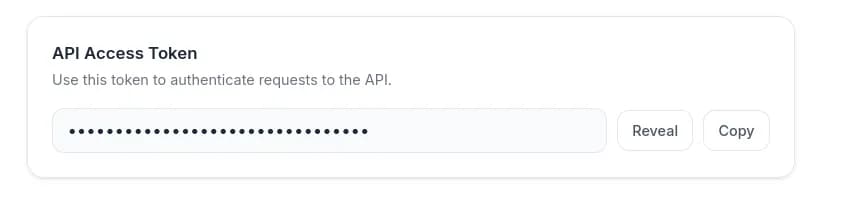
Before you can use the API you need to log in on the website and copy your access token. You'll find it under API Access Token in your account settings — click Reveal to show it, then copy it.
Send the token as a bearer token on every request:
Authorization: Bearer YOUR_ACCESS_TOKENThe generation workflow
Three endpoints cover the full cycle, plus one for structured data exports:
POST /— upload the drawings and start the generation process. The response contains amodel_id.GET /api/job_status— poll with thatmodel_iduntil the status isFinished(orError/Failed).POST /api/download_ifc_by_model_id— download the finished IFC model.GET /api/export_model— optionally export the model's data as JSON, CSV or Excel.
Endpoints
Start model generation
POST https://api.makeabim.com/ — sent as multipart/form-data. Returns a model_id.
| Parameter | Description |
|---|---|
floor_plan_upload | An ordered list of floor plans used to generate the model. Storeys go from lowest to highest. |
elevation_upload | A list of elevation drawings used for model generation. project_data links each drawing to a cardinal direction. North is currently assumed to be up in the floor plans. |
notify_via_email | Boolean controlling whether you receive an email notification when the model is finished. Defaults to true. |
project_data | JSON-formatted field containing settings such as scale and default heights. Default values are used if it is left empty — see Project data below. |
Check job status
GET https://api.makeabim.com/api/job_status
| Parameter | Description |
|---|---|
model_id | The ID of the model, returned by the request that started generation. |
Download the model
POST https://api.makeabim.com/api/download_ifc_by_model_id — sent as JSON.
| Parameter | Description |
|---|---|
model_id | The ID of the model. |
ifc_version | Either ifc4x3 or ifc2x3. |
Export model data
GET https://api.makeabim.com/api/export_model — downloads JSON, CSV or Excel data about the model.
| Parameter | Description |
|---|---|
model_id | The ID of the model. |
format | json, csv or excel. |
Project data
Drawing and settings input is called project data. It is a JSON object of the shape {"floorplans": [{...}], "elevations": [{...}]}, with one entry per uploaded drawing.
floorplans
| Field | Description |
|---|---|
fileName | Name of the file. |
unit | Unit for the pixel/value measurement. Supports m, ft and in. |
pixels | Distance in pixels. None if using automatic scaling. |
value | The corresponding real-world distance in the unit above, used to set the scale for the image. None if using automatic scaling. |
storeyHeight | Height of the storey. Default 3. |
windowHeight | Height of windows. Default 1.6. Overridden by values derived from the elevation drawings if elevations are provided. |
windowHeightFromFloor | Height of the window sill above the floor. Default 0.8. |
doorHeight | Height of doors. Default 2.1. Overridden by values derived from the elevation drawings if elevations are provided. |
elevations
| Field | Description |
|---|---|
fileName | Name of the file. |
direction | North, East, West or South. North is currently assumed to be up in the floor plans. |
unit | Unit for the pixel/value measurement. Supports m, ft and in. |
pixels | Distance in pixels. None if using automatic scaling. |
value | The corresponding real-world distance in the unit above. None if using automatic scaling. |
Example project_data
{
  "floorplans": [
    {
      "fileName": "your_floorplan",
      "unit": "m",
      "pixels": 462,
      "value": "5",
      "storeyHeight": "3",
      "windowHeight": "1.6",
      "windowHeightFromFloor": "0.8",
      "doorHeight": "2.1"
    }
  ],
  "elevations": [
    {
      "fileName": "your_elevation",
      "direction": "North",
      "unit": "m",
      "pixels": null,
      "value": null
    }
  ]
}
Example Python script
Requirements:
- Basic Python skills.
- Save the script to a folder.
- Copy your access token from your account settings on makeabim.com and paste it into the code on line 5.
- One or more floor plans. The script assumes these are in the same folder as the code and named
storey_0.pngandstorey_1.png. - The
requestslibrary, installed withpip install requests.
import time
import requests

API_URL = "https://api.makeabim.com/"
TOKEN = """Paste your token here. You can find it in your Account settings on makeabim.com"""
HEADERS = {
    "Authorization": f"Bearer {TOKEN}"
}


def upload_floorplans():
    files = [
        ("floor_plan_upload", open(r"storey_0.png", "rb")),
        ("floor_plan_upload", open(r"storey_1.png", "rb")),
    ]

    data = {
        "notify_via_email": "False"
    }

    print("Starting model generation...")

    response = requests.post(
        API_URL,
        headers=HEADERS,
        files=files,
        data=data
    )

    response.raise_for_status()
    json_data = response.json()

    model_id = json_data.get("model_id")

    if not model_id:
        raise Exception(f"model_id missing in response: {json_data}")

    print(f"Model id is {model_id}")
    return model_id


def poll_status(model_id):
    status = "Not started"

    while status not in ["Finished", "Error", "Failed"]:
        time.sleep(5)

        response = requests.get(
            f"{API_URL}/api/job_status",
            headers=HEADERS,
            params={"model_id": model_id}
        )

        response.raise_for_status()
        json_data = response.json()

        print(f"Response {json_data}")

        status = json_data.get("status")
        print(f"Model status {status}")

    return status


def download_ifc(model_id):
    print("Downloading model to model.ifc")

    response = requests.post(
        f"{API_URL}/api/download_ifc_by_model_id",
        headers={**HEADERS, "Content-Type": "application/json"},
        json={
            "model_id": model_id,
            "ifc_version": "ifc2x3"
        }
    )
    response.raise_for_status()

    with open("model.ifc", "wb") as f:
        f.write(response.content)


def download_excel(model_id):
    print("Downloading model data to model.xlsx")

    response = requests.get(
        f"{API_URL}/api/export_model",
        headers=HEADERS,
        params={
            "model_id": model_id,
            "format": "excel"
        }
    )

    response.raise_for_status()

    with open("model.xlsx", "wb") as f:
        f.write(response.content)


def main():
    model_id = upload_floorplans()
    status = poll_status(model_id)

    if status != "Finished":
        raise Exception(f"Model generation failed with status: {status}")

    download_ifc(model_id)
    download_excel(model_id)
    print("Finished.")


if __name__ == "__main__":
    main()
Example Bash script
The same flow with curl and jq. Replace your_token_here with your access token.
#!/bin/bash
authorization='Authorization: Bearer your_token_here'
url="https://api.makeabim.com/"

echo "Starting model generation"
response=$(curl -X POST "$url" -H "$authorization" \
  -H 'Content-Type: multipart/form-data' \
  -F floor_plan_upload=@storey_0.png \
  -F floor_plan_upload=@storey_1.png \
  -F notify_via_email='False' --silent)
model_id=$(jq -r '.model_id' <<< $response)
echo "Model id is $model_id"

model_status="Not started"
while [ "$model_status" != "Finished" ] && [ "$model_status" != "Error" ] && [ "$model_status" != "Failed" ]; do
    sleep 5
    response=$(curl -X GET "$url/api/job_status?model_id=$model_id" -H "$authorization" --silent)
    echo "Response $response"
    model_status=$(jq -r '.status' <<< $response)
    echo "Model status $model_status"
done

echo "Downloading model to model.ifc"
curl -X POST "$url/api/download_ifc_by_model_id" -H "$authorization" \
  -H "Content-Type: application/json" \
  --data "{\"model_id\":\"$model_id\",\"ifc_version\":\"ifc2x3\"}" > model.ifc

echo "Downloading model data to model.xlsx"
curl -X GET "$url/api/export_model?model_id=$model_id&format=excel" -H "$authorization" > model.xlsx

echo "Finished."